In this chapter, “Nested if in Python”, we will learn why and how nested if is used. Flow-charts, examples and programs are included to make it easier to understand.
Nested if Statement
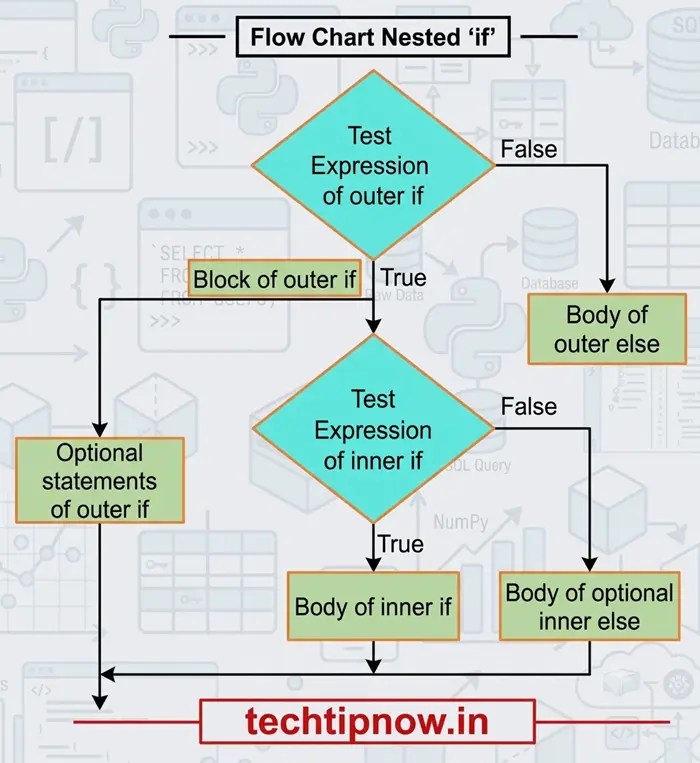
When an if statement is placed inside another if statement, it is called a Nested if Statement. It is used when a decision depends on multiple conditions that must be checked one after another.
Syntax:
if condition1:
# Block of code executed if condition1 is True
if condition2:
# Block of code executed if both condition1 and condition2 are True
statement(s)
else:
# Block of code executed if condition1 is True but condition2 is False
statement(s)
else:
# Block of code executed if condition1 is False
statement(s)
Flow chart of Nested if
Example Programs of nested if
Example: Program to check a number is postive or not.
num = float(input(“Enter a number”))
if num >= 0:
if num == 0:
print(“Zero”)
else:
print(“Positive Number”)
else:
print(“Negative Number”)
Output:
Positive Number
Example: Largest among three numbers
a = int(input(“Enter first number: “))
b = int(input(“Enter second number: “))
c = int(input(“Enter third number: “))
if a > b:
if a > c:
print(“Largest number is:”, a)
else:
print(“Largest number is:”, c)
else:
if b > c:
print(“Largest number is:”, b)
else:
print(“Largest number is:”, c)
Output:
Enter first number: 25
Enter second number: 40
Enter third number: 15
Largest number is: 40
Example: Check Whether a Person is Eligible to Vote Using Nested if
age = int(input(“Enter your age: “))
if age >= 18:
citizen = input(“Are you an Indian citizen? (yes/no): “)
if citizen == “yes”:
print(“You are eligible to vote.”)
else:
print(“You are not eligible to vote.”)
else:
print(“You are not eligible to vote.”)
Output:
Enter your age: 20
Are you an Indian citizen? (yes/no): yes
You are eligible to vote.