In this chapter – Python Tokens, We’ll explore the key types of tokens, including keywords, identifiers, literals, operators, and punctuators, with simple explanations and examples. By the end of this chapter, you’ll have a clear understanding of how these fundamental elements shape Python programs and control how they are written and executed.
Before diving into Python Tokens, make sure you are familiar with the following chapters. If you haven’t studied them yet, we recommend going through them first, as they will make learning Python Tokens much easier and more meaningful.
You can find the links to these chapters below:
Python Introduction
Python IDLE
Python Working Modes
Structure of a Python Program
Python Character Set
- A character set is the collection of valid characters that can be used in a programming language.
- Python supports both ASCII and Unicode characters, allowing programmers to use a wide range of symbols and languages.
- The Python character set includes the following:
- Alphabets – All uppercase letters (A–Z) and lowercase letters (a–z).
- Digits – Numbers from 0 to 9.
- Special Symbols – Symbols like +, -, *, /, @, #, $, %, &, etc.
- White Spaces – Blank space, tab space, newline, and carriage return.
- Other Characters – All other ASCII and Unicode characters supported by Python.
Python Tokens
- The smallest individual unit in a Python program is called a token.
- Tokens are also known as lexical units.
- Every statement and instruction in a Python program is formed using tokens.
- Python mainly has the following types of tokens:
- Keyword
- Identifier
- literal
- Operator
- Punctuator
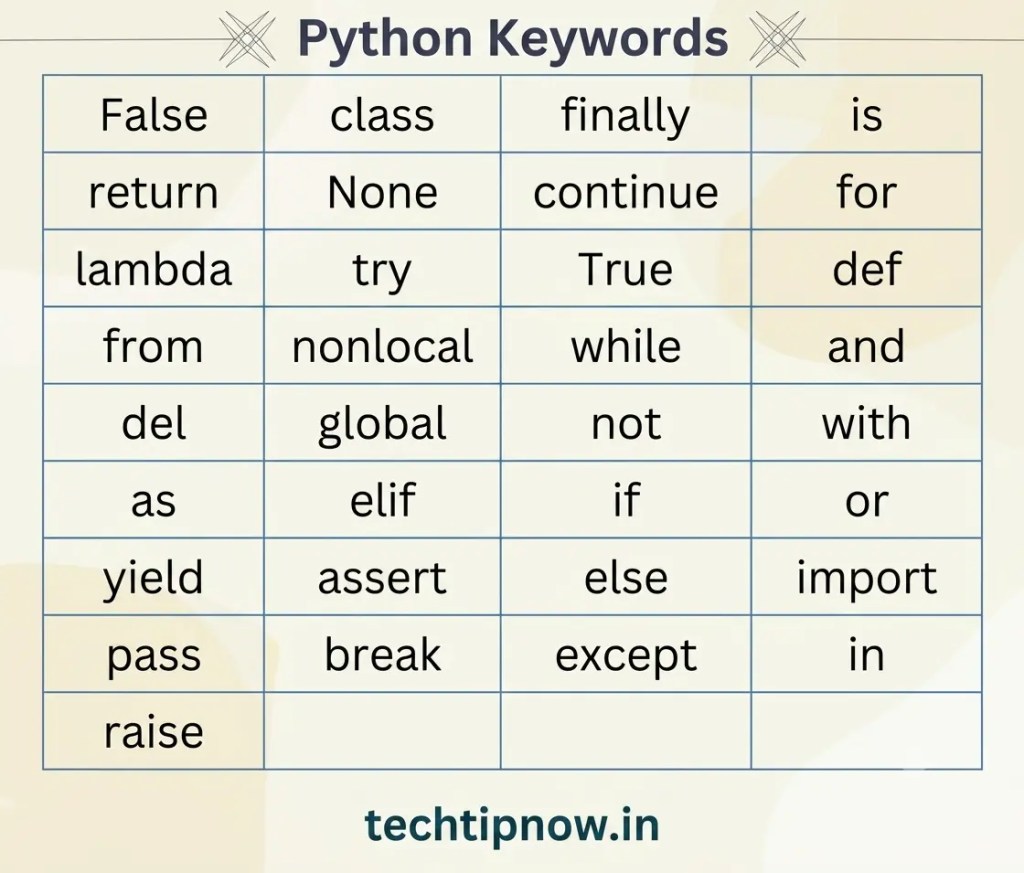
Python Keywords
- Keywords are reserved words in Python.
- Each keyword has a special meaning for the Python interpreter.
- Keywords cannot be used as variable names or identifiers.
- Python is case-sensitive, so keywords must be written exactly as defined.
Common Python Keywords
Identifiers in Python
- Identifiers are names used to identify variables, functions, and other entities in a program.
Rules for Naming Identifiers
- An identifier must begin with an alphabet or underscore (_).
- It can contain alphabets, digits (0–9), and underscores.
- An identifier cannot start with a digit.
- It can be of any length, but meaningful names are preferred.
- Keywords or reserved words cannot be used as identifiers.
- Special symbols like !, @, #, $, %, etc. are not allowed in identifiers.
| Identifier | Valid / Invalid | Reason |
| student_name | Valid | Uses letters and underscore correctly |
| marks123 | Valid | Identifier can contain digits after letters |
| _total | Valid | Identifier can start with underscore |
| priceAmount | Valid | Uses alphabets only |
| EMPLOYEE1 | Valid | Capital letters and digits are allowed |
| 2value | Invalid | Identifier cannot start with a digit |
| student-name | Invalid | Hyphen (-) is not allowed |
| class | Invalid | class is a Python keyword |
| total marks | Invalid | Spaces are not allowed |
| @price | Invalid | Special symbols like @ are not allowed |
Python Literals
- Literals are fixed values that are directly used in a program and stored in memory.
- These values are commonly assigned to variables using identifiers.
Types of Literals in Python
String Literals
- String literals are sequences of characters written inside:
- Single quotes ‘ ‘
- Double quotes ” “
- Triple quotes ”’ ”’ or “”” “””
- A string may also contain non-graphic characters such as tabs and backspaces.
Escape Characters
- Escape characters are used to insert special characters inside a string.
- An escape sequence is written using a backslash (\) followed by another character.
- Escape sequences help represent characters that have special meanings in Python, such as quotation marks, new lines, and tabs.
Common Escape Sequences
| Escape Sequence | Meaning |
| \n | New Line |
| \t | Tab Space |
| \\ | Backslash |
| \’ | Single Quote |
| \” | Double Quote |
| \b | Backspace |
Numeric Literals
Numeric literals represent numbers in different forms.
- Integer Literal – whole numbers without decimal points: 25, -10, 0, 0b1010, 0o17, 0x1F
- Float Literal – real numbers containing decimal points: 99.62, -45.8, 0.35E-7
- Complex Literal – numbers written in the form a + bj, where: a = real part,b = imaginary part
- Examples: 3+5j, 7j, 2-4j
- Boolean Literal – represent logical values i.e. True or False
Special (None) Literal – is a special literal used to represent: No value, Empty value, Absence of value
Collection Literals
Collection literals are used to store multiple values together.
| Collection Type | Example |
| List | [1, 2, 3] |
| Tuple | (10, 20, 30) |
| Dictionary | {“A”: 1, “B”: 2} |
| Set | {5, 6, 7} |
Operators in Python
- Operators are special symbols used to perform operations on values and variables.
- Python supports different types of operators: Arithmetic, Relational, Logical, Identity, and Membership Operators. (Operators are explained in detail in a later part of these notes)
Punctuators
- Punctuators are tokens used to organize program structure, program statements, and expressions.
- They help in making the code structured, readable, and properly formatted.
| Punctuator | Name / Use |
| [] | Square brackets – used for lists, indexing, slicing |
| {} | Curly brackets – used for dictionaries and sets |
| () | Parentheses – used in functions, expressions, and grouping |
| , | Comma – used to separate items |
| ‘ ‘ | Single quotes – used for string literals |
| ” “ | Double quotes – used for string literals |
| # | Hash – used for single-line comments |
| @ | At symbol – used in decorators |
| : | Colon – used in loops, conditions, and function definitions |