In this chapter, we will explore the basic structure of a Python program and understand how its different building blocks work together. We will break down a Python program into essential elements such as statements, comments, indentation, blocks, operators, and expressions.
Understanding these components will help you write well-structured Python programs and better understand how they behave during execution. A good knowledge of program structure also makes it easier to identify mistakes, improve readability, and collaborate with other programmers.
Structure of Python Program
Look at the following Python program shown in the image:
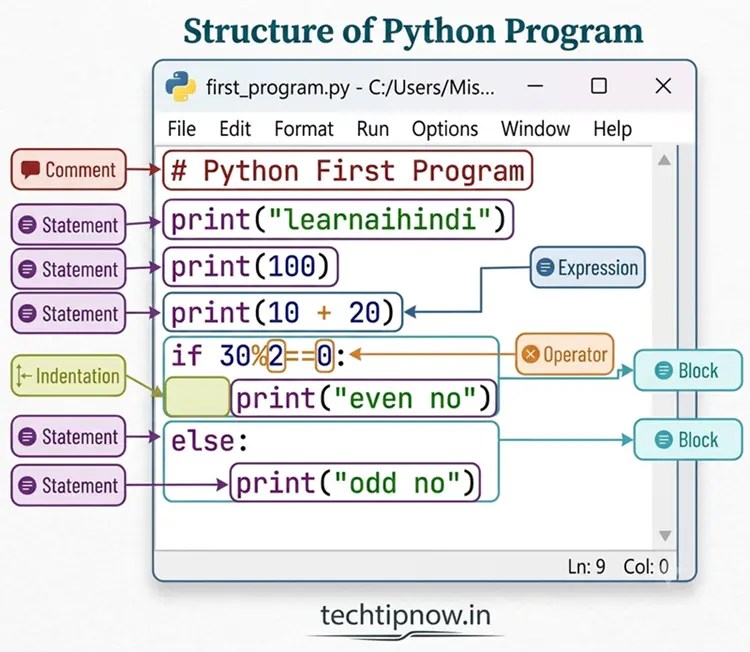
As depicted in the image, a Python program consists of several important elements, including:
- Statement
- Comments
- Indentation
- Blocks
- Operators
- expressions
In this chapter, we will focus mainly on statements, comments, indentation, and blocks, as these are essential for writing basic Python programs and understanding how Python code is organized. Expressions and operators are also important elements of a Python program; however, we will study them in detail in the upcoming chapters
Statements in Python
A statement is an instruction written in a Python program that tells the computer to perform a specific task. Python executes statements one by one to produce the desired output.
Examples:
name = “Sanjay”
print(name)
X = 23
Multi-line Statements
Sometimes, long statements can be written across two or more lines. Such statements are called multi-line statements.
Python allows multi-line statements using:
- Continuation character (\)
- Parentheses (())
- Square brackets ([])
- Braces ({})
- Semicolon (;)
Multi-line statements improve the readability of long calculations, expressions, and data collections that cannot fit comfortably on a single line.
Example:
total = 10 + 20 + 30 + \
40 + 50
Output:
150
In the above example, the statement is written on two lines using the continuation character (\).
Example:
message = (“Artificial Intelligence ” \
“is an exciting field.”)
print(message)
Output:
Artificial Intelligence is an exciting field.
Types of Multiline Statements
| Type of Multi-line Statement | Usage | Example |
| Using Continuation Character (\) | Used to continue a statement on the next line. | result = 10 + 20 + 30 + \ 40 + 50 print(result) Output:150 |
| Using Parentheses () | Statements inside parentheses can span multiple lines without using \. | total_marks = ( 85 + 90 + 88 + 92 + 95 ) print(total_marks) Output:450 |
| Using Square Brackets [] | Lists can be written across multiple lines for better readability. | subjects = [ “English”, “Maths”, “Science”, “Computer” ] print(subjects) Output: [‘English’, ‘Maths’, ‘Science’, ‘Computer’] |
| Using Braces {} | Sets or dictionaries can be spread across multiple lines. | colors = { “Red”, “Green”, “Blue”, “Yellow” } print(colors) Output: {‘Red’, ‘Green’, ‘Blue’, ‘Yellow’} |
| Using Semicolons (;) | Multiple statements can be written on a single line. | name = “Aman”; age = 15; grade = “10th” print(name, age, grade) Output: Aman 15 10th |
Comments in Python
- Comments are pieces of text written inside a program.
- They are used to explain what a program or a block of code does.
- Comments do not affect the execution or output of the program.
- In Python, comments start with the # (hash) symbol.
Single-line Comment
A single-line comment is used to write a short note or explanation on a single line. It begins with the # symbol.
Example:
# Displaying a welcome message
print(“Welcome to Python”)
Output:
Welcome to Python
Multi-line Comment
A multi-line comment is used when the explanation is too long to fit on a single line. In Python, multi-line comments can be written using triple quotes (”’ ”’ or “”” “””).
Example:
“””
This program displays
a welcome message
on the screen.
“””
print(“Welcome to Python”)
Output:
Welcome to Python
Indentation in Python
- Indentation means leaving spaces at the beginning of a line of code.
- It is used to show which statements belong to the same block of code.
- But in Python, indentation is compulsory and part of the syntax.
- Python uses indentation in structures like if, for, while, functions, and classes.
Example:
age = 18
if age >= 18:
print(“You are eligible to vote.”)
In this example, print() statement belongs to if block because it is indented.
Blocks (or Suites)
- A block (or suite) is a group of statements written together inside another statement, such as a loop, condition, or function.
- All statements that belong to the same block must have the same indentation level.
Example:
for i in range(2):
print(“Hello”)
print(“Python”)
print(“Program Ended”)
Output:
Hello
Python
Hello
Python
Program Ended
In this example, both print() statements are part of the for loop block because they have the same indentation. However, print(“Program Ended”) is outside the loop, so it is not part of the loop block.